部署K8S需要开放的端口
- k8s
- 2025-12-02
- 0评论
当我们部署K8S时,常规操作是关闭防火墙的,这样做确实是为了方便部署,图省事。
如果从安全的角度出发,应该是开启防火墙,开放部署K8S时所需要开放的防火墙端口。
在此,我整理部署K8S时所需要开放的防火墙端口,具体如下:
1. k8s组件端口
(1) Master 节点端口
| 端口 | 协议 | 应用 |
| 6443/tcp | TCP | API Server |
| 2379-2380/tcp | TCP | etcd |
| 10250/tcp | TCP | kubelet API( 对 Master 开放) |
| 10257/tcp | TCP | controller-manager |
| 10259/tcp | TCP | scheduler |
(2) Worker 节点端口
| 端口 | 协议 | 应用 |
| 10250/tcp | TCP | kubelet API |
| 10256/tcp | TCP | IPVS healthz(IPVS 模式必需) |
| 30000-32767/tcp/udp | TCP/UDP | NodePort 服务 |
2. Ingress 端口
(1) NodePort 模式
- NodePort 范围:30000-32767/tcp/udp
- 外部访问无需额外端口,Worker 已开放 NodePort 范围
(2) HostNetwork 模式
- HTTP:80/tcp
- HTTPS:443/tcp
- 必须开放对应端口
LoadBalancer 模式一般由云提供负载均衡,不需节点开放 80/443。
3. CNI配置
Calico 根据模式不同,需要开放的端口:
| 模式 | 端口 / 协议 | 用途 |
| IP-in-IP | 协议 4(IPIP) | 跨节点封包 |
| VXLAN | 4789/udp | VXLAN 封装 |
| BGP | 179/tcp | BGP 路由同步 |
| Typha(大集群) | 5473/tcp | Typha <-> Felix 通信 |
如果不使用 BGP 或 Typha,可以不开放 179/5473。
4. firewalld配置
(1) master节点配置
配置Kubernetes核心端口及worker节点相关连接端口,Calico 网络插件,Ingress/NodePort 可选:
# 开启防火墙并设置开机自启动
systemctl enable --now firewalld

# Kubernetes 核心资源
firewall-cmd --permanent --add-port=6443/tcp
firewall-cmd --permanent --add-port=2379-2380/tcp
firewall-cmd --permanent --add-port=10250/tcp
firewall-cmd --permanent --add-port=10257/tcp
firewall-cmd --permanent --add-port=10259/tcp
firewall-cmd --permanent --add-port=10256/tcp

# Ingress HostNetwork / NodePort(可选)
firewall-cmd --permanent --add-port=80/tcp
firewall-cmd --permanent --add-port=443/tcp
firewall-cmd --permanent --add-port=30000-32767/tcp
firewall-cmd --permanent --add-port=30000-32767/udp

# Calico 网络插件
firewall-cmd --permanent --add-port=4789/udp
firewall-cmd --permanent --add-port=179/tcp
firewall-cmd --permanent --add-port=5473/tcp
firewall-cmd --permanent --add-protocol=ipip

# 重新加载防火墙
firewall-cmd --reload
(2) Worker节点配置
Worker 节点主要跑 kubelet、kube-proxy、Pod(可能包含 NodePort / Ingress):
# 开启防火墙并设置开机自启动
systemctl enable --now firewalld

# kubelet
firewall-cmd --permanent --add-port=10250/tcp

# kube-proxy IPVS
firewall-cmd --permanent --add-port=10256/tcp

# Ingress HostNetwork / NodePort(可选)
firewall-cmd --permanent --add-port=80/tcp
firewall-cmd --permanent --add-port=443/tcp
firewall-cmd --permanent --add-port=30000-32767/tcp
firewall-cmd --permanent --add-port=30000-32767/udp

# Calico 网络插件
firewall-cmd --permanent --add-port=4789/udp
firewall-cmd --permanent --add-port=179/tcp
firewall-cmd --permanent --add-port=5473/tcp
firewall-cmd --permanent --add-protocol=ipip

# 重新加载防火墙
firewall-cmd --reload
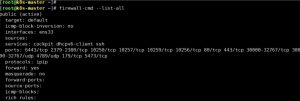
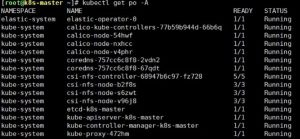
配置后,我特意重启了一下,再检查策略:
# 检查策略
firewall-cmd --list-all

# 检查集群状态
kubectl get node

# 检查Pod状态
kubectl get pod -A